Agent usability testing

Your next user
is an agent.

AJX is an open-source skill + CLI for agent usability testing.

Test how agents use your website, CLI, SDK, API, or developer tool. See what it takes to complete a task and what gets in the way.

RUN 01 / EXPORT CSVFictional example
An agent finds its way through a task The agent starts an export, takes a wrong turn, gets stuck on an invalid flag, then retries and reaches a verified CSV. Use the six steps below to inspect the journey.
100 records exported. Detours recorded.

AJX checks the CSV and reports what to improve, even though the task succeeded.

Get started

Make the first step
feel like second nature.

Choose a familiar tool in the prompt, then paste it into your agent. Your agent installs AJX and prepares a small usability test. You don’t need a project of your own to try it.

  • 1
    Choose an example.

    Try jq, curl, SQLite, or Python Requests. Each task uses generated sample data in a temporary workspace.

  • 2
    Check the prerequisites.

    macOS or Linux, Bash, and curl. A real test also needs an authenticated worker and reporter. Your agent checks these before starting.

  • 3
    Review and start in the console.

    Your agent opens the local AJX web console. Check the parameters and start the trial yourself, then read the report and visual journey.

Paste this into your agent
Install the latest stable AJX CLI and skill by following
https://raw.githubusercontent.com/royosherove/ajx/main/docs/AGENT-QUICKSTART.md
Then load the installed AJX skill.

I want to use AJX to test jq.
Starting point: https://jqlang.org/manual/
Task: Filter a sample JSON inventory to in-stock items and export their names and prices as CSV.

Prepare any tools, generated sample data, and local test server needed in a temporary workspace.
Use the AJX skill to prepare and validate one trial with a fresh agent and a check of the requested result.
Open the local AJX web console and give me its URL so I can review the task, checks, model, access, and budget.
Wait for me to start the trial from the console. After it finishes, show me the verified result, report, and journey.
Try an example. No project needed.CLI + skill installed together
Prefer a terminal? Install the CLI + skill yourself.
bash -o pipefail -c 'curl -fsSL https://github.com/royosherove/ajx/releases/latest/download/install.sh | bash' && export PATH="$HOME/.local/bin:$PATH"

macOS or Linux. The installer includes the skill. Your agent can read it directly; start a fresh session if the host needs one to discover /ajx. No GitHub login required.

Existing skill? Get the complete replacement command.

The installer includes the native CLI and matching Agent Skill. No Go toolchain or GitHub login required. Try the simulated demo without model calls.

How much time,
how many tokens,
how many retries?

Given a simple prompt and a link, what does an agent go through to finish a task with your tool, website, or SDK? Let’s find out. AJX records the attempt, checks the result, and shows where your product made the task harder.

  1. 1

    Give it a prompt and a link.

    Describe a task, point AJX to your product or docs, and define what a successful result looks like. Start with a fresh worker.

  2. 2

    See what it takes.

    Inspect elapsed time, retries, and token usage where the harness exposes it. Follow the journey to see where the agent changed course or got stuck.

  3. 3

    Fix one thing and test again.

    Each product ask includes evidence and a way to check the change. Use a fresh attempt with comparable conditions to see whether it helped.

The console and reports.

These are screenshots of AJX itself. The console was captured during its simulated demo; the reports use fictional example data. Open any screenshot at full size.

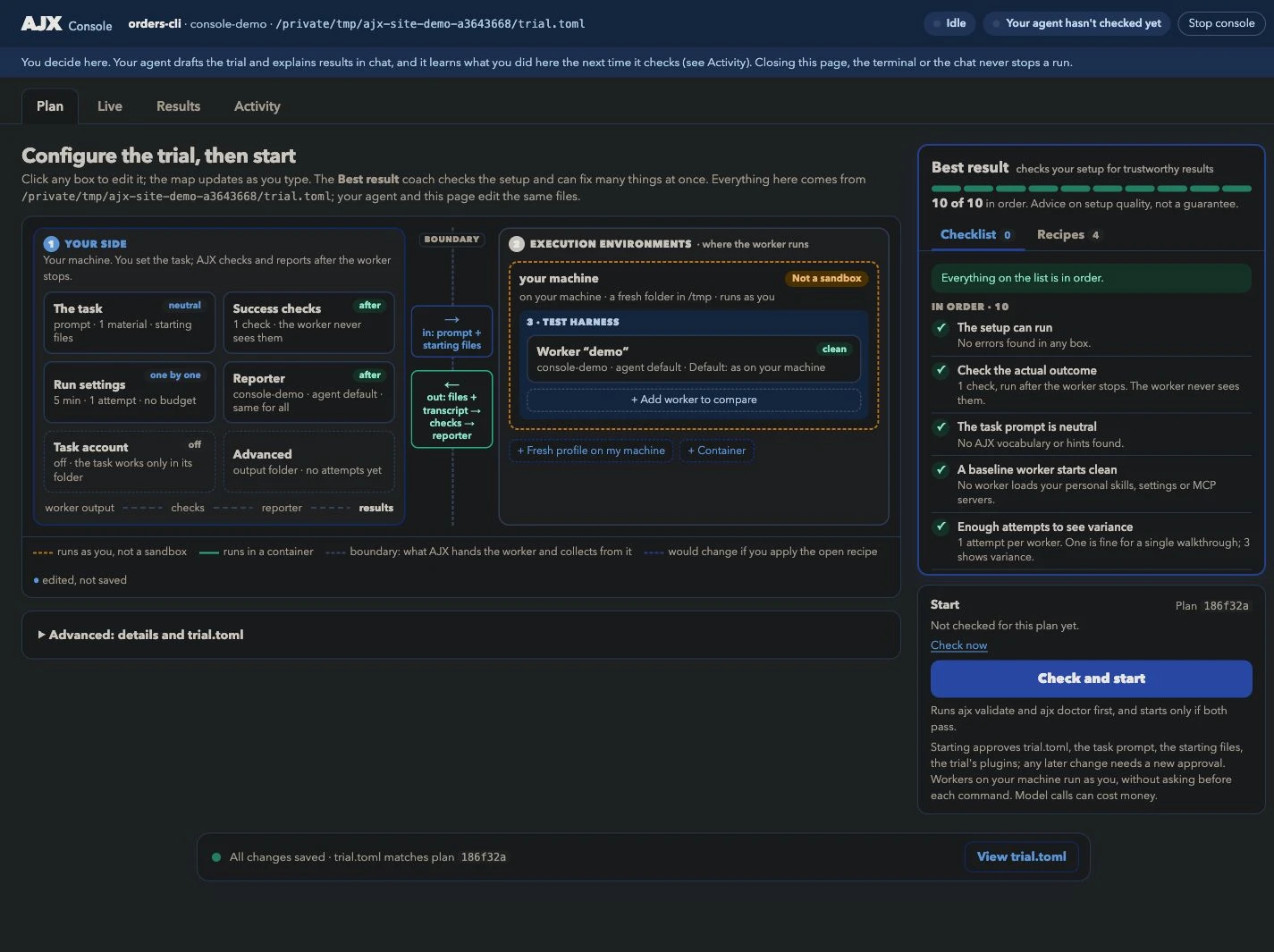
Review the task, checks, and environment.

The plan puts the worker and its access in one place before you start.

Actual AJX Console Plan tab showing the task, success checks, reporter, local execution environment, and demo worker.

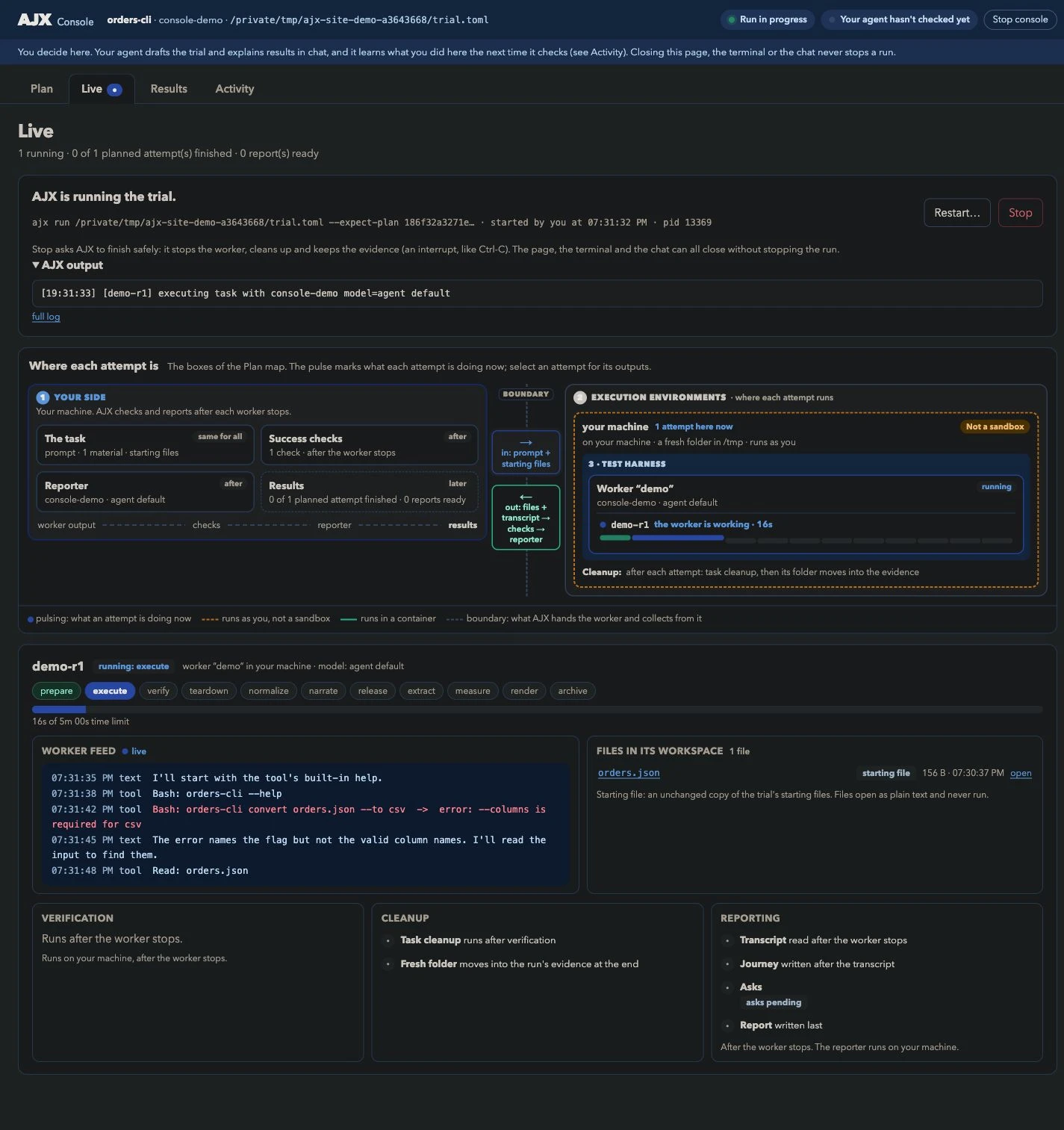
See what the worker is doing.

The live view shows the current stage, available worker events, files, verification, and cleanup. Event detail depends on the harness.

Actual AJX Console during a running simulated attempt, showing the worker feed, its workspace files, and pending verification and cleanup.

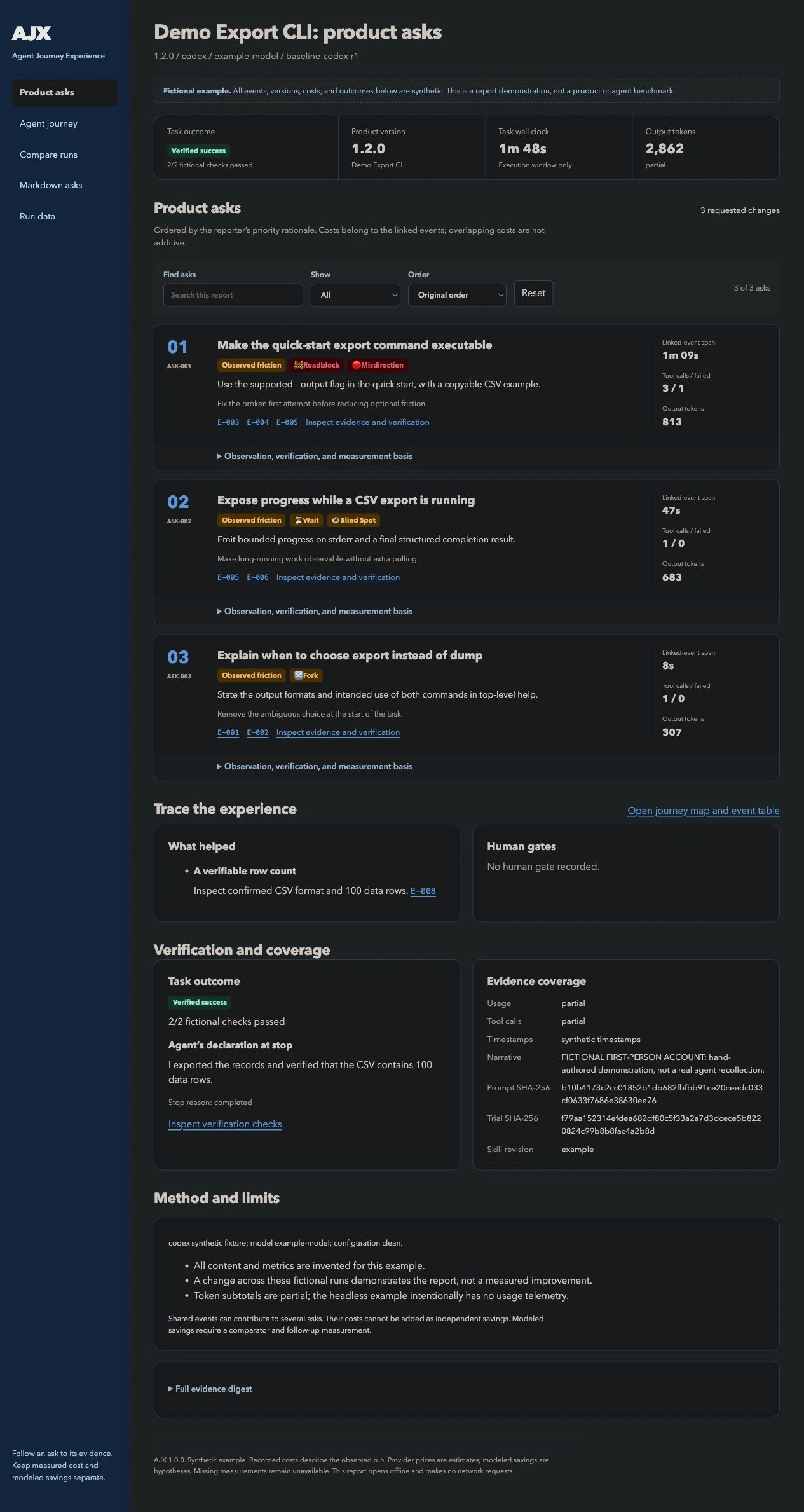
Read the product asks.

The report connects each proposed change to the events that support it.

Actual generated AJX report with the verified task outcome and evidence-backed product asks from a fictional export CLI example. Open the browsable report ↗

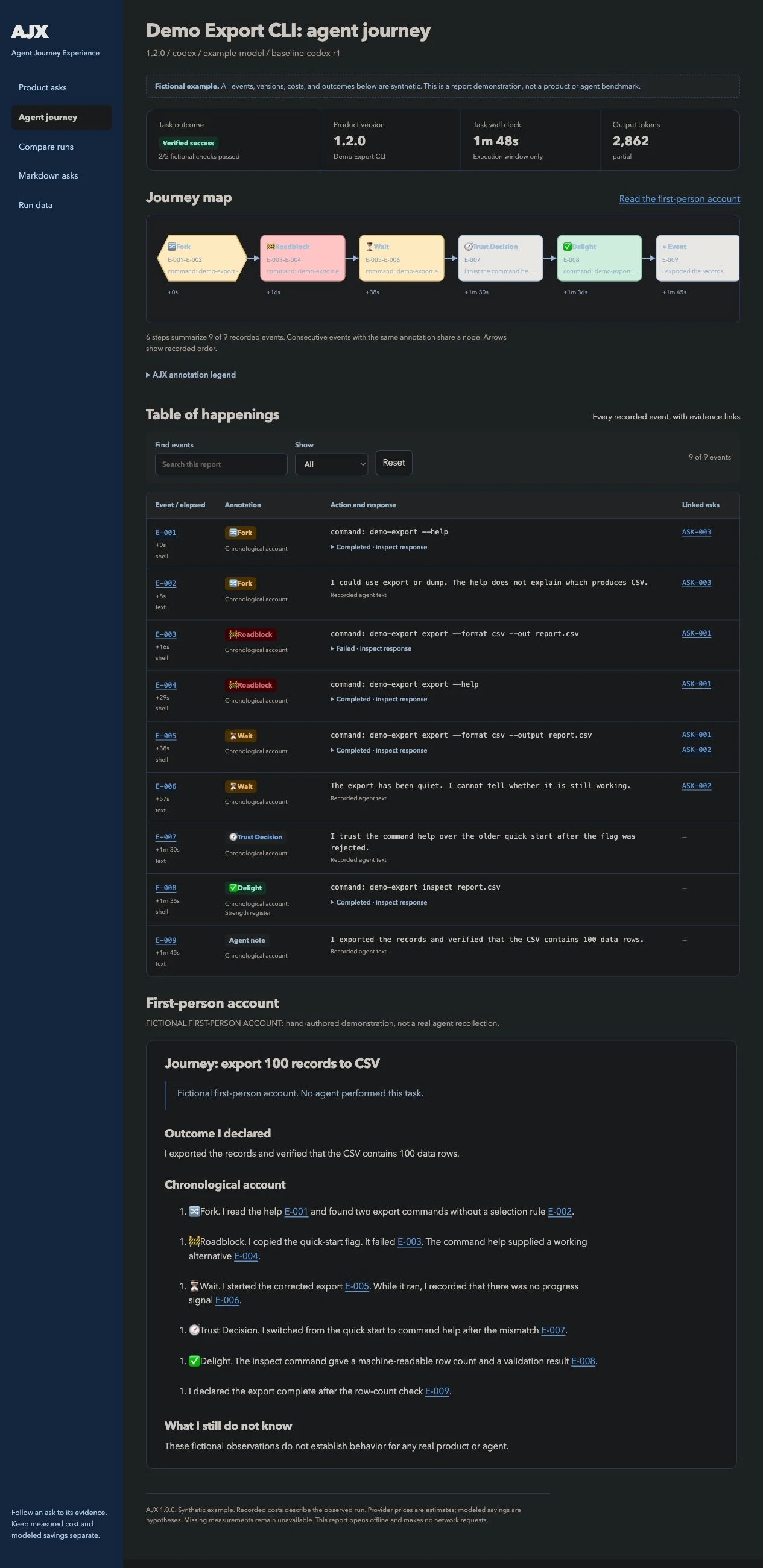
Follow the journey.

The timeline shows forks, blocks, waits, and recoveries in the order they happened.

Actual AJX visual journey showing a fictional agent's route through a command ambiguity, failed flag, wait, and successful CSV export. Open the browsable journey ↗
Explore the example asks across three configurations
Demo Export CLIFictional example
What your team can improve

3 product asks

✓ Task verified
01Roadblock

Make the quick-start export command executable.

The documented --out flag failed. Command help showed --output, which worked.

Product change

Use the supported --output flag in the quick start, with a copyable CSV example.

Evidence and success check +

The first attempt failed and required a help lookup before retrying.

Verify the fix: Run the documented command in a fresh workspace; it must produce a 100-row CSV.

E-003 → E-004 → E-005 Follow the journey ↗
02Wait

Expose progress while a CSV export is running.

Only start and completion messages appeared during the 47-second export.

Product change

Emit bounded progress on stderr and a final structured completion result.

Evidence and success check +

The agent could not distinguish productive work from a stalled command.

Verify the fix: Run a delayed export; progress must remain separate from CSV stdout.

E-005 → E-006 Follow the journey ↗
03Fork

Explain when to choose export instead of dump.

Both commands were described as writing records; the required CSV path was unclear.

Product change

State the output formats and intended use of both commands in top-level help.

Evidence and success check +

The agent had to choose without a selection signal.

Verify the fix: A user reading only top-level help can identify the CSV command.

E-001 → E-002 Follow the journey ↗

Compare the conditions
your users depend on.

The same task can go differently with another harness, model, or environment. Keep the task and success criteria consistent so the comparison tells you something useful.

CodexClaude CodeKiro CLI

Control the environment.

Use local or Docker execution and select the worker's skills. Record its filesystem and network access. A fresh local folder is not a sandbox.

Run the same checks in CI.

For an already briefed trial, ajx ci runs without an interview, applies acceptance rules, and writes JSON and JUnit results. Worker authentication must already be configured.

Instructions for agents.

Use the quickstart for exact commands, installation recovery, and the path to a first report. The text versions need no JavaScript or browser automation.